YOUR BUSINESS, IN YOUR HANDS

Every
conversation.
One place.
All yours.

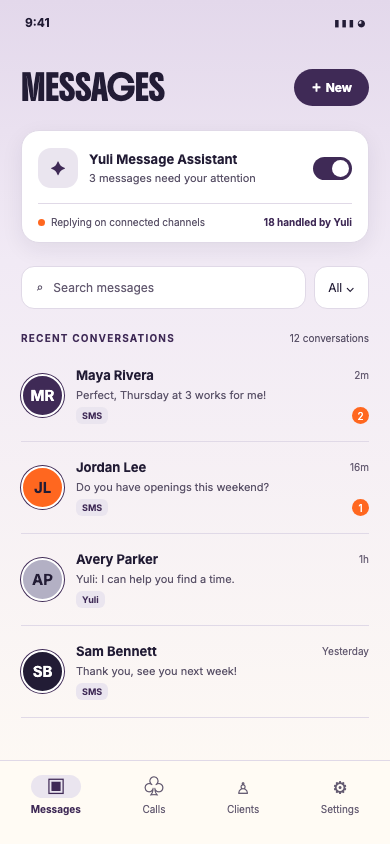
Your business number is the front door. Run calls, texts, and client relationships from one mobile app. YuliFlow remembers what matters, learns how you work, and helps your team answer with context.

One app for the owner. One shared story for every client.
YuliFlow mobile app Messages screen showing YULI Message Assistant and sample SMS conversations
YULIFLOW MOBILE APP · SAMPLE CLIENT DATA
MADE FOR PEOPLE-FIRST BUSINESSESSCROLL TO EXPLORE ↓
01 / THE IDEA

Your phone number is
your most powerful asset.

Clients remember the number they text, the voice that answers, and the feeling that someone knows them. That connection should belong to your business—not a booking marketplace, a borrowed inbox, or a rotating account.

Meet the platform
01

Keep your number

Start with a dedicated business number or begin bringing the one your clients already know.

02

Know your people

Conversation history and useful client context stay connected, so every reply feels personal.

03

Grow your way

Your business knowledge becomes the foundation for an assistant that works in your voice.

02 / THE PLATFORM

Your customer world.
In one mobile app.

Answer, call, remember, and decide when YULI Assistant helps—all from the phone already in your hand.

01 / CONNECTED CONVERSATIONS↗

All the ways they reach you.
One place to answer.

Your business number brings calls and texts into the owner's app today. Instagram and Messenger are being connected, so those conversations can join the same client story.

✦ SMS◉ Calls◌ Instagram · coming soon◌ Messenger · coming soon
02 / CLIENT MEMORY↗
M
Maya RiveraReturning client
♥
✦

Prefers afternoon visits
and natural lash styles.

Remember what matters.

Useful facts about each client build into a richer profile, ready when the conversation picks up again.

03 / YULI ASSISTANT↗

More you, with every reply.

YULI Assistant drafts helpful answers using approved business knowledge. You decide what becomes part of its long-term memory.

03 / HOW IT WORKS

A smarter front desk.
Still yours to run.

Start with your number and let the context grow naturally. YuliFlow stays close to the way a great team already works.

Get on the list
01

Bring the connection home.

Choose a dedicated business number or request to port the one you already use. Your customers keep reaching you directly.

02

Let conversations become context.

Messages, call notes, and recordings when enabled help your team understand each client’s story before responding.

03

Put your assistant to work.

Use editable drafts in Assistant mode, or let Autopilot handle eligible routine texts. Your team can always take the lead.

04 / YOUR BUSINESS, REMEMBERED

An assistant that
actually gets you.

YuliFlow learns from message threads and, when recording is enabled, from call transcripts too. It surfaces reusable knowledge for the owner to review, while useful client details stay with the right profile.

✦ Answers grounded in your approved business knowledge
✦ Client context that follows the conversation
✦ Assistant and Autopilot modes you control
“

Great service isn’t just having the answer.
It’s remembering the person.

✦ ─── ✦
05 / HUMAN BY DESIGN

Technology should
make room for care.

Owners and virtual assistants can work from the same conversation and the same assistant state. YULI Assistant can suggest; your people can edit, reply, and teach it what really matters.

Because the goal isn’t to sound automated. It’s to make every client feel known.

Join the waitlist
THE DETAILS

A few good
questions.

We’re building YuliFlow alongside real service businesses. Here’s how it works today.

Can I use my existing business number?

Yes. You can request to port an existing number. Porting depends on your current provider and takes time; YuliFlow guides the setup while it is processed. You can also start with a new dedicated number.

Will YULI Assistant reply to every customer?

No. In Assistant mode, it drafts replies for your team to review. In Autopilot mode, it answers only eligible routine messages when it has enough approved context. Your team can switch back to Assistant mode.

How does the assistant learn about my business?

YuliFlow can propose reusable answers from conversations, but the salon owner reviews business knowledge before it becomes available to the assistant. Client-specific facts belong to the relevant client profile.

What happens to call recordings?

Where call recording is enabled, callers hear a disclosure. Recordings and transcripts are stored privately and scheduled for automatic deletion after 90 days. Availability and recording rules may vary by location.

Are Instagram and Messenger available yet?

The integrations are being prepared and depend on Meta permissions and account connection. SMS, calls, and the shared assistant experience are the current foundation.

BE FIRST IN LINE

Your next chapter
starts with hello.

Join the YuliFlow waitlist. Leave your email or phone number and we’ll let you know when the app is ready for your business.

How should we reach you?